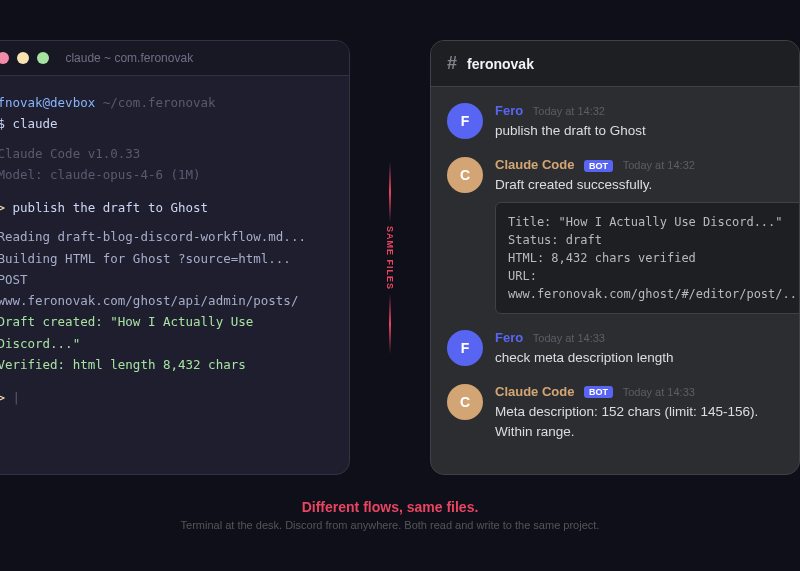
I run Claude Code from my terminal, my phone, and sometimes from a meeting room. Discord is one of those interfaces. They're not connected to each other. They don't need to be. They all work with the same files.
I manage Ringier Slovakia - roughly 160 people running the country's largest news site and digital community platforms. I push AI adoption across the company. Before I push anything, I build it myself first. This is how I built a setup where Claude Code works the same regardless of where I am.
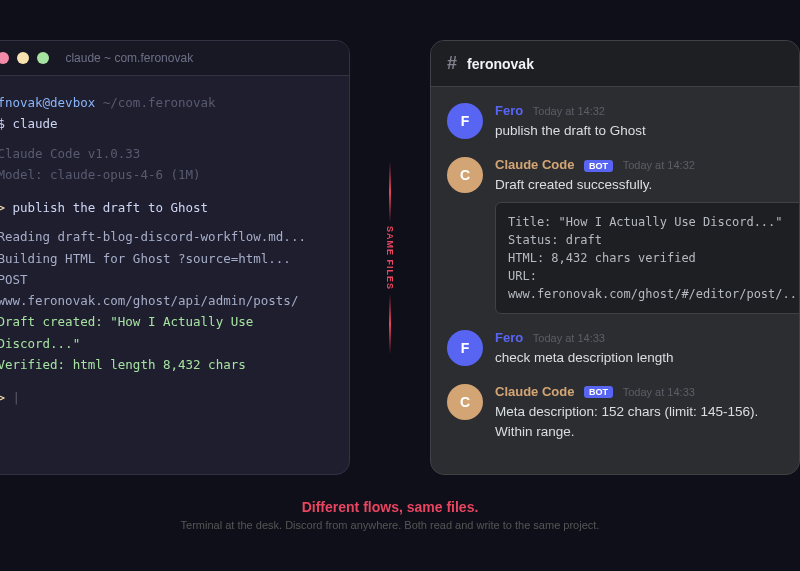
All visuals in this article are illustrative mockups designed to resemble the Discord interface - not actual screenshots.
Same files, same truth
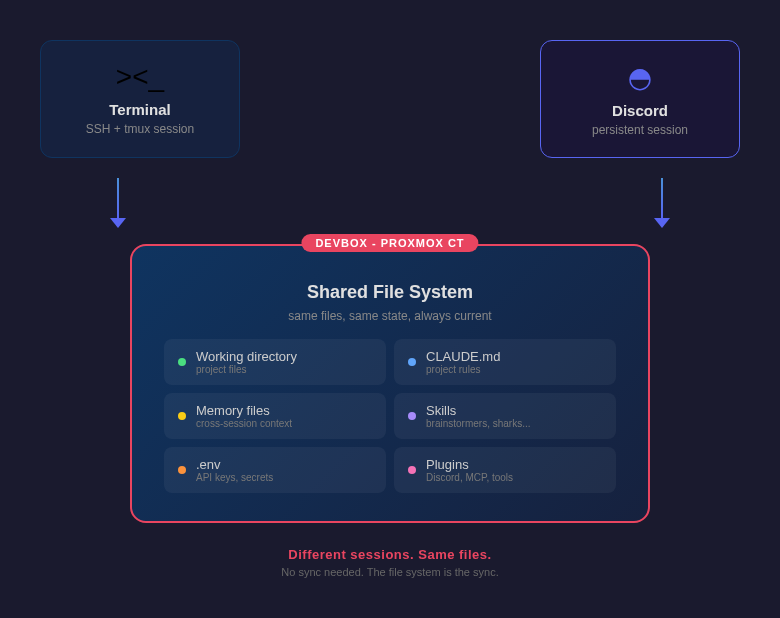
This is the thing most people miss. Terminal and Discord are separate Claude Code sessions. They don't share a process. But they share everything that matters.
Same working directory. Same CLAUDE.md with all my project rules. Same memory files that carry context across conversations. Same .env with API keys. When I kick off a content research pipeline from Discord, the results land in the same folders I see when I open the terminal later. When I edit a file from the terminal, Discord's session reads the updated version.
There's no sync layer. There doesn't need to be. Both flows read and write to the same file system on the same machine. That's the sync.
I run a brainstorming skill from Discord during a commute. It writes research files, recommendations, a draft. I get home, open the terminal, and the files are there. I pick up where Discord left off. The files are on the same machine. That's all it takes.
How to set up Claude Code with Discord
Claude Code runs on my devbox - a Proxmox container at home that stays on 24/7. I have two ways in.
Terminal: I SSH into the devbox, attach a tmux session, and run Claude Code directly. Full interactive experience. This is desk work.
Discord: A persistent Claude Code session runs with the Discord plugin connected. It listens for messages, executes them, responds in the channel. This is everywhere-else work - iPhone, iPad, Android, any device with Discord installed.
Both sessions point to the same project directory, read the same CLAUDE.md, write to the same files. The machine stays on, the files stay current, and whichever flow I use next sees what the previous one did.
One channel per project
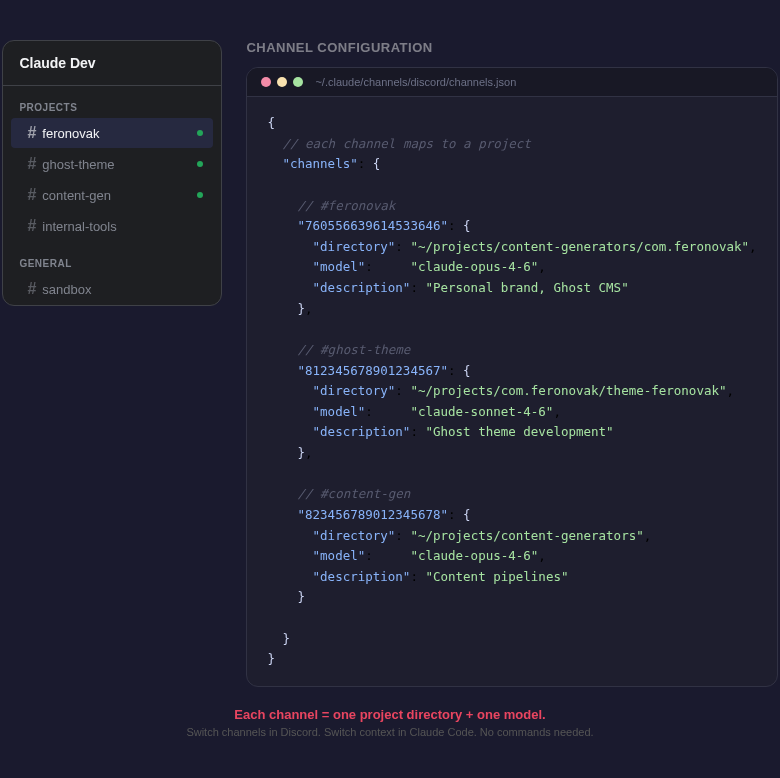
I run multiple projects - feronovak.com, content generators, Ghost themes, internal tools. Each has its own Claude Code working directory with its own CLAUDE.md and its own rules.
I set up separate Discord channels for each project. When I type in the feronovak channel, Claude Code works in the feronovak directory. It knows the Ghost CMS rules, the publishing workflow, the voice guidelines. When I switch to the theme channel - different project, different files, different context.
The channel becomes the project selector. No "cd into the right folder" commands. No "remember, we're working on the theme now." The channel IS the context.
Run Claude Code skills from any device
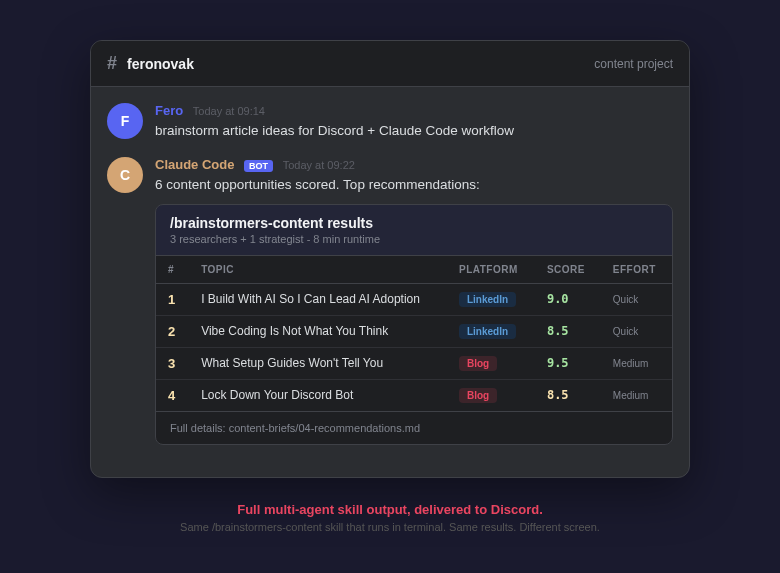
Claude Code isn't just a terminal that runs ls and git status. It runs skills - complex multi-step workflows that I've built or installed.
From Discord, I can type /brainstormers-content and kick off a full content research pipeline. Three parallel agents scan trends, audience demand, and competitive landscape. A strategist synthesizes everything into scored recommendations. The whole thing runs for 5-10 minutes and drops the results back into Discord.
I can run /business-sharks to validate a business idea through five AI agents - market research, competitive intel, digital scout, financial modeler, and the shark that delivers the verdict.
These are the same skills that work in my terminal. Works the same. The only difference is I might be reading the results on my phone while walking to a meeting.
JARVIS mode - live updates, no notification spam
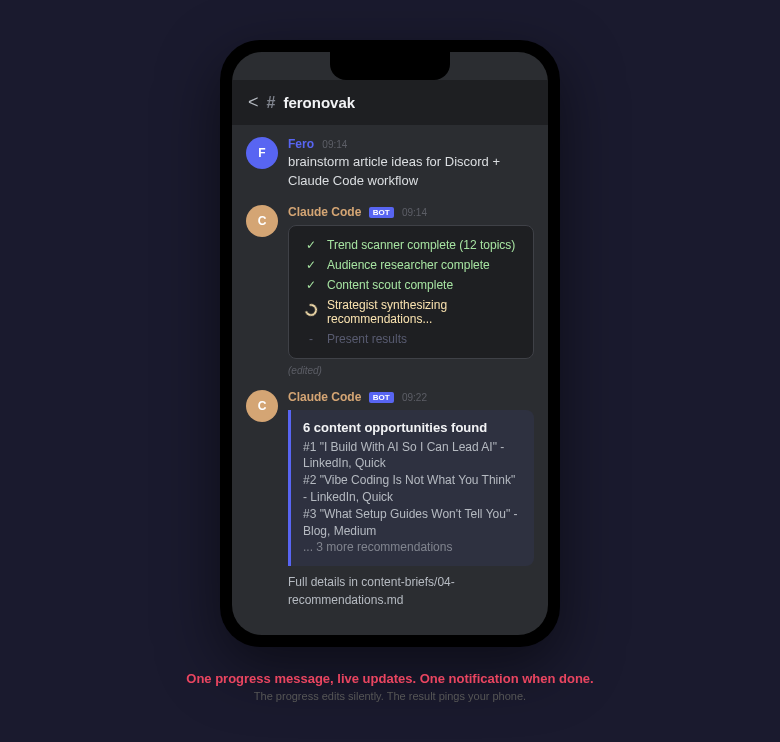
Running a multi-agent pipeline from Discord creates a problem. If every step sends a new message, my phone buzzes 15 times during a 10-minute research task. That's not useful. That's annoying.
The solution: the bot edits one message to show real-time progress. I see "launching trend scanner..." become "trend scanner complete, starting audience research..." then "all research done, synthesizing recommendations..." - all in the same message.
No notification storm. I glance at my phone, see where things are, and go back to what I was doing. When the final result lands as a new message - that one notification actually means something. The task is done, the output is ready.
Threads for parallel work
Long Claude Code responses in a busy channel turn the chat into a wall of text. Ask one question, get a multi-message response, ask another - and you've lost track of which answer belongs to which request.
I use Discord threads for every task. "Deploy the theme" gets its own thread. "Check the Ghost API" gets another. "Research content ideas" gets a third. When I come back an hour later, each thread has the full conversation. The main channel stays clean.
The 2000 character problem
Discord rejects messages over 2000 characters. Claude Code responses are often much longer. The first time I asked for something non-trivial, the response stopped mid-sentence. No error. Just silence after a truncated answer.
The plugin handles this by splitting long responses into chunks. But the default behavior cuts at exactly 2000 characters - mid-word, mid-code-block, mid-sentence. Three messages that are painful to read on a small screen.
The fix took two commands:
/discord:access set chunkMode newline
/discord:access set textChunkLimit 1800
newline splits at paragraph boundaries. The 1800 limit gives headroom for Discord's formatting. Responses now arrive as readable blocks instead of chopped fragments.
When the bot answers everything
I set up one channel with --no-mention so I didn't have to @mention the bot every time. Convenient - until the bot started picking up everything.
I'd type ls as a note to myself. The bot would execute ls on my devbox and return the output. I'd paste a file path for reference. The bot would try to read it. Regular messages to other people - the bot would interpret them as instructions.
The fix: keep requireMention: true for any channel where humans also talk. @mention the bot or reply to its messages when you want a response. Everything else gets ignored. Only use --no-mention in a dedicated command channel where every message is an instruction.
Sending and receiving images through Discord
Claude Code can send files through the Discord channel. I use this for visual checks - "take a screenshot of the Ghost preview," "show me the Lighthouse audit," "what does the homepage look like right now?" The response arrives as an image right in Discord. Faster than SSH-ing into a machine to open a browser.
But it works the other direction too. I snap a photo or a screenshot on my phone, drop it into Discord, and Claude Code analyzes it. A screenshot of a broken layout - "what's wrong with this CSS?" A photo of a whiteboard from a meeting - "extract the action items." An error message on someone else's screen that they sent me - "what does this mean and how do I fix it?"
The phone becomes both the display and the input. I see what Claude Code produced, and I send it what I need analyzed. No file transfers, no email attachments, no "let me get to my laptop first."
Model and usage visibility
I wanted to know what's happening under the hood. Which model is handling my request - Opus, Sonnet, Haiku? How many tokens am I burning? How much of the context window is consumed?
I don't want Opus processing a simple file read that Sonnet handles fine. And when I'm deep in a multi-agent pipeline, I want to know if I'm approaching context limits before the session degrades.
Claude Code reports this on request. I ask, I get the numbers, I adjust. Simple visibility that prevents waste and surprises.
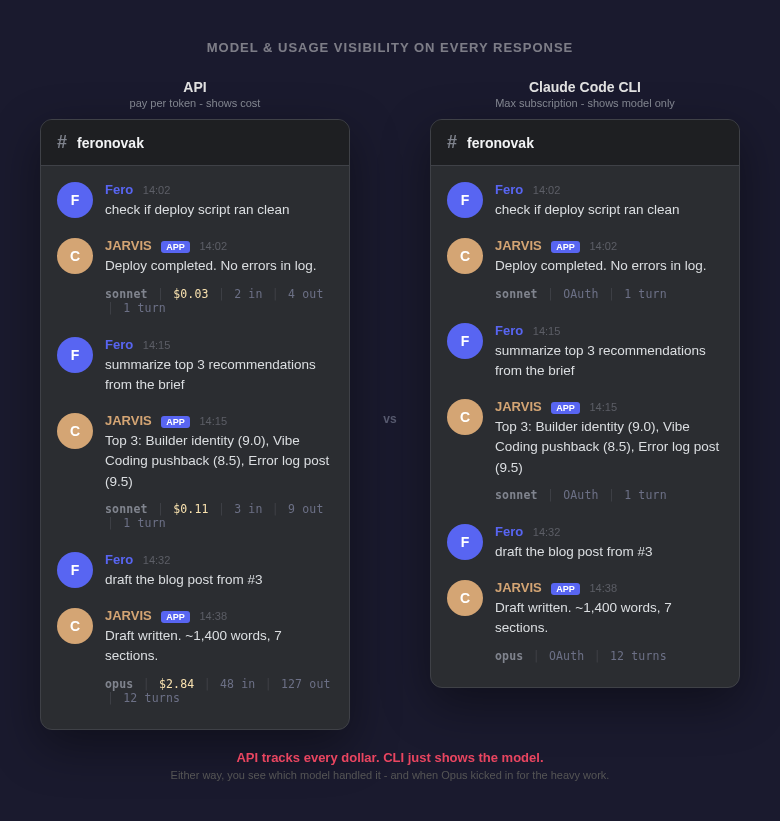
What Discord remote access replaced in practice
This setup didn't replace terminal work. Complex debugging, multi-file refactoring, anything that needs sustained back-and-forth - that's still at the desk.
What it replaced is the 60% of tasks that follow the same pattern: "run this thing and tell me what happened."
- Publish a draft to Ghost - from my phone between meetings
- Check if the deploy script ran clean - from a taxi
- Kick off a content research pipeline - before a morning call, results ready when I'm done
- Read and summarize the latest analytics brief - while walking to lunch
- Verify a Ghost API response after a config change - 10pm, no laptop
None of these need a terminal. All of them produce results in the same files. When I open the terminal next, everything is there.
The next wave of AI tooling isn't better models. It's better access to the models we already have. Most of the friction in my day wasn't Claude Code being too slow or too dumb. It was me not being near a terminal. Discord fixed that. The setup took an evening. The payoff is every day since.
I'm Fero Novak, Managing Director at Ringier Slovakia. 12+ years in digital media, from product specialist to MD. I build with AI personally because I want to understand it before I ask my teams to adopt it. This is Weekend Builds #2.