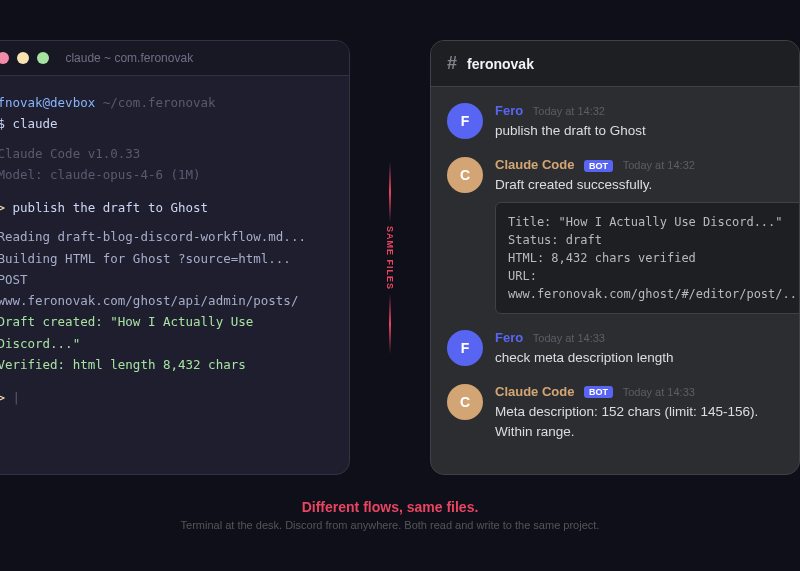
I run Claude Code from my terminal, my phone, and sometimes from a meeting room. Different sessions, same files, same memory, same rules. Discord is just another interface to the same machine.
I manage Ringier Slovakia - roughly 160 people running the country's largest news site and digital community platforms. Most of my day is product, business, team. When I'm at the terminal I build; the rest of the time, I'm not. That's the problem this setup fixes.
Everyone is arguing about which model is smartest. Most of the time, the model isn't the bottleneck. I am. The context from my morning doesn't follow me to lunch. The setup I configured at my desk lives on a machine at home. Discord is how I stay connected to it.
Same files, same truth
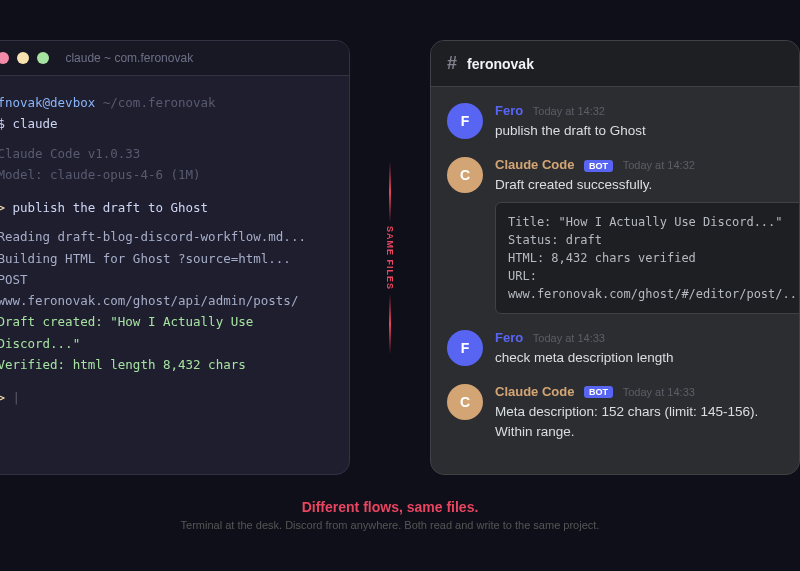
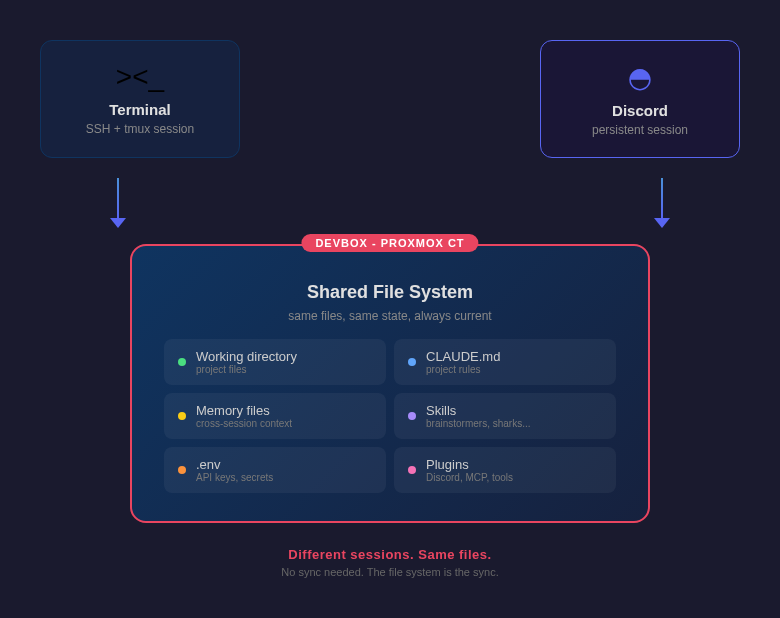
This is the thing most people miss. Terminal and Discord are separate Claude Code sessions. They don't share a process. But they share everything that matters.
Same working directory. Same CLAUDE.md with all my project rules. Same memory files that carry context across conversations. Same .env with API keys. When I kick off a content research pipeline from Discord, the results land in the same folders I see when I open the terminal later. When I edit a file from the terminal, Discord's session reads the updated version.
There's no sync layer. There doesn't need to be. Both flows read and write to the same file system on the same machine. That's the sync.
I run a brainstorming skill from Discord during a commute. It writes research files, recommendations, a draft. I get home, open the terminal, and the files are there. I pick up where Discord left off. The files are on the same machine. That's all it takes.
How the setup works
Claude Code runs on my devbox - a small server at home that stays on 24/7. I have two ways in.
Terminal: I SSH to the devbox, attach a tmux session, and run Claude Code directly. Full interactive experience. This is desk work.
Discord: A custom bot I call JARVIS sits between Discord and Claude Code on the same devbox. It listens in per-project channels, spins up a Claude Code session per Discord thread, and streams the responses back. Any device with Discord installed becomes an interface - iPhone, iPad, Android, someone else's browser.
Both paths point to the same project directories, read the same CLAUDE.md, write to the same files. The machine stays on, the files stay current, and whichever flow I use next sees what the previous one did.
Channel is the project, thread is the session
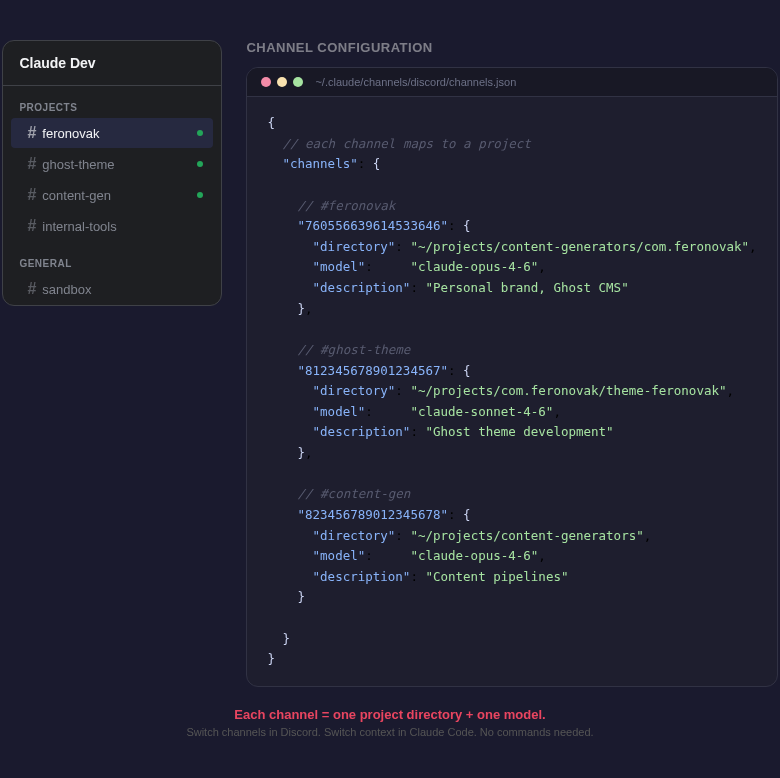
I run multiple projects - feronovak.com, content generators, Ghost themes, internal tools. Each has its own Claude Code working directory with its own CLAUDE.md and its own rules.
In Discord I map one channel per project. The channel defines the project: which working directory, which model, which voice rules. The channel doesn't hold the conversation - a thread does. Every task gets its own thread, and every thread keys its own Claude Code session.
Type deploy the theme in the feronovak channel - JARVIS picks it up automatically, creates a thread, runs Claude Code in the feronovak directory, replies inside the thread. Ask another question in the main channel - a new thread, a new session, same project. Switch to the theme channel - different project, different files, different context.
No "cd into the right folder." No "remember, we're working on the theme now." The channel IS the project. The thread IS the task.
Run Claude Code skills from any device
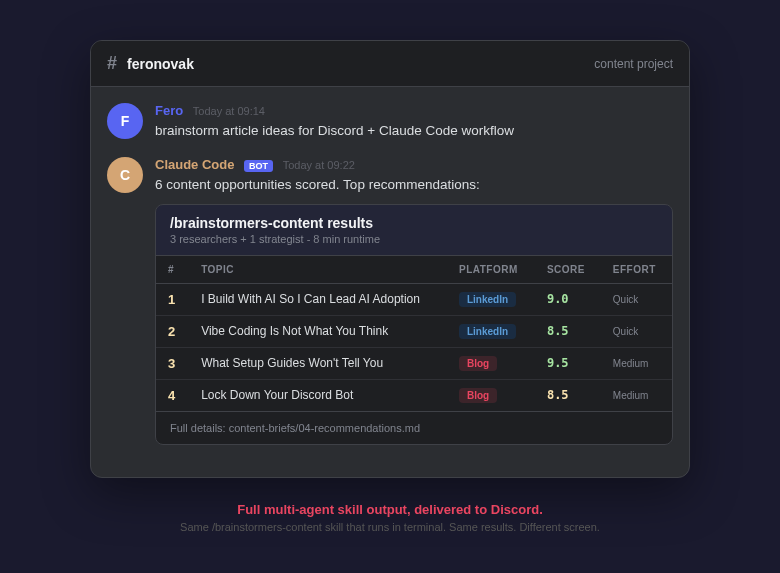
Claude Code isn't just a terminal that runs ls and git status. It runs skills - complex multi-step workflows that I've built or installed.
From Discord, I can type /brainstormers-content and kick off a full content research pipeline. Three parallel agents scan trends, audience demand, and competitive landscape. A strategist synthesizes everything into scored recommendations. The whole thing runs for 5-10 minutes and drops the results back into Discord.
I can run /business-sharks to validate a business idea through five AI agents - market research, competitive intel, digital scout, financial modeler, and the shark that delivers the verdict.
These are the same skills that work in my terminal. Works the same. The only difference is I might be reading the results on my phone while walking to a meeting.
Live progress, one message, one notification
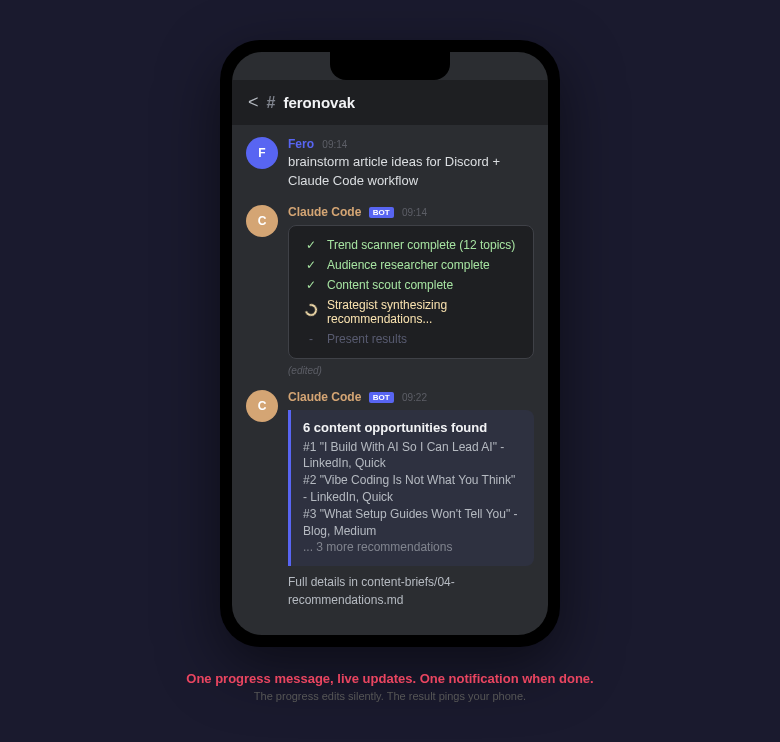
Running a multi-agent pipeline from Discord creates a problem. If every step sends a new message, my phone buzzes 15 times during a 10-minute research task. That's not useful. That's annoying.
JARVIS edits one message to show real-time progress. I see "launching trend scanner..." become "trend scanner complete, starting audience research..." then "all research done, synthesizing recommendations..." - all in the same message.
No notification storm. I glance at my phone, see where things are, and go back to what I was doing. When the final result lands as a new message, that notification means something. The task is done, the output is ready.
Long responses without the chopped-fragment problem
Discord rejects messages over 2000 characters. Claude Code responses are often much longer. The naive fix - cut at 2000 - produces painful reads on a small screen: split mid-word, mid-code-block, mid-sentence. Three truncated messages in place of one clean answer.
JARVIS splits responses at section boundaries - markdown headers, blank lines, code block boundaries. Headers start a new message. Code blocks are never split. If a section still doesn't fit, it breaks at the last newline before the limit, not mid-token. The default target is 1900 characters per message, which leaves headroom for Discord's own formatting.
Responses arrive as readable blocks. A 6000-character answer becomes three cleanly-split messages instead of three chopped fragments. On a phone screen, that's the only version worth reading.
Owner-only, channel-allowlisted
JARVIS answers me and only me. It checks two things on every message: is the sender me, and is the channel one of my configured project channels? If both are true, it runs Claude Code. Otherwise it ignores the message. No @mention needed - not for me, not for anyone.
That's the whole security model. One Discord account (mine) gets access. A fixed set of channels are project-scoped. Everything else is filtered out at the first two lines of the message handler.
HAL9000, my other Discord bot, uses an @mention pattern instead - more appropriate for shared spaces, but means I'd have to tag it every time. JARVIS runs in my private project channels, so the mention isn't needed and the friction is gone. I type, it responds.
Images, both ways
JARVIS can send files through the Discord channel. I use this for visual checks - "take a screenshot of the Ghost preview," "show me the Lighthouse audit," "what does the homepage look like right now?" The response arrives as an image right in Discord. Faster than SSH-ing into a machine to open a browser.
It works the other direction too. I snap a photo or a screenshot on my phone, drop it into Discord, and Claude Code analyzes it. A screenshot of a broken layout - "what's wrong with this CSS?" A photo of a whiteboard from a meeting - "extract the action items." An error message on someone else's screen that they sent me - "what does this mean and how do I fix it?"
The phone becomes both the display and the input. I see what Claude Code produced, and I send it what I need analyzed. No file transfers, no email attachments, no "let me get to my laptop first."
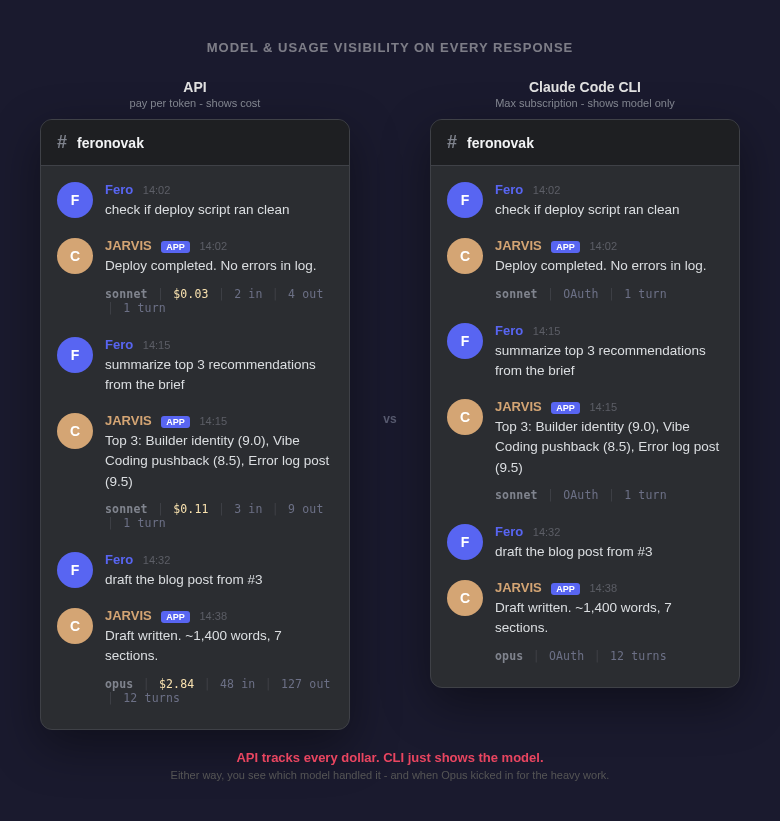
Every reply shows the meter
I wanted to know what's happening under the hood without asking for it. Which model handled the turn. How much it cost. How many tokens in and out. How many turns the session has seen. Whether context is getting heavy.
JARVIS appends a one-line footer to every reply. On OAuth (my default - runs on my Claude Max subscription):
-# opus | OAuth | 3 turnsModel, auth source, turn count. When I switch a bot to the API instead, the footer adds cost and token counts:
-# opus | API: $0.03 | 12K in | 4K out | 3 turnsWhen context gets heavy (over 50K input tokens), either footer adds a warning:
-# opus | OAuth | 11 turns | ⚠️ Context is large. Send !reset if starting a new task.Visibility without asking. I see the meter on every message. Opus handling a file read that Sonnet could do? Switch. Context creeping up before the session degrades? End it clean.
Commands I actually use
Short, typed inline with the task. No slash menus, no UI overhead.
!fast <prompt>- force Sonnet for this turn. Faster, cheaper, good enough for file reads, summaries, simple edits.!opus <prompt>- force Opus for a heavy turn. Plans, refactors, anything where accuracy matters.!reset- clear the session for this thread. Next message starts fresh.!stop- kill the running Claude process in this thread. For runaway loops or wrong-track tasks.!status- scope, project, session age, turn count, git state, disk, sibling threads. One-screen snapshot before I dive in.!cwd /path- override the project directory for this thread. Useful when one project needs a shared-library view.!pwd/!ls/!git/!diff/!disk- quick shell and git snapshots without burning a Claude turn.
When a thread archives, JARVIS posts a one-line summary into the thread (turn count, age, working directory) and deletes the session. No orphan sessions sitting around in the state file.
Why this still works after Anthropic's third-party ban
In February 2026, Anthropic updated its usage policy. In April, they started enforcing it. OAuth tokens from Claude Free, Pro, and Max subscriptions can only be used in official Anthropic products - Claude Code CLI and Claude.ai. Any third-party tool that extracts those tokens or routes subscription auth into its own client is in violation of the Consumer Terms.
This killed OpenClaw and most of the Claude harness ecosystem. I run a second Discord bot called HAL9000 for content workflows. It used to go through OpenClaw. After the change, I had to move HAL9000 onto the paid Anthropic API - billed per token, not through my subscription.
JARVIS didn't need to move. Instead of reimplementing Claude Code's auth, it spawns the actual claude binary as a subprocess - the same CLI Anthropic ships, logged in via claude login on the devbox, invoked with claude -p --output-format stream-json. That's me running my own Claude Code CLI. Discord is just the input channel. No token extraction, no impersonation, nothing to break the subscription terms.
The distinction Anthropic drew: calling the real CLI is fine. Extracting the credentials to use elsewhere is not. JARVIS sits on the allowed side of that line by design.
If you're building anything similar, the question to ask is simple: am I using the official CLI as Anthropic ships it, or am I replacing its auth layer? The first is fine. The second isn't.
What the setup replaces in practice
This didn't replace desk work. Deep sessions with multi-agent pipelines where I'm steering between turns, long-form writing, weekend builds - that's still at the terminal. The rest isn't.
What it replaced is the half of my Claude Code work that follows the same pattern: "run this thing and tell me what happened."
- Validate a business idea through five AI agents - from a taxi, verdict in my pocket before the meeting starts
- Kick off a content research pipeline - before a morning call, scored recommendations ready when I'm done
- Publish a draft to Ghost - from my phone between meetings
- Run a competitive analysis on a new market - while walking to lunch
- Check if the deploy script ran clean - 10pm, no laptop
None of these need a terminal. All of them produce results in the same files. When I open the terminal next, everything is there.
Most of the friction in my day wasn't Claude Code being too slow or too dumb. It was me not being near a terminal. Discord fixed that. The setup took an evening. The payoff is every day since.
Stop chasing the next model. Fix where you work from.
The next wave of AI tooling isn't better models. It's better access to the models we already have.
I'm Fero Novak, Managing Director at Ringier Slovakia. 12+ years in digital media, from product specialist to MD. I build with AI personally because I want to understand it before I ask my teams to adopt it. This is Weekend Builds #2.